Skip to content
MapDataScraper | Fast & Easy Maps Data Scraper
  • Home
  • About Us
  • Services
  • Blog
  • Contact
Try for Free
Try for Free
MapDataScraper | Fast & Easy Maps Data Scraper
  • Home
  • About Us
  • Services
  • Blog
  • Contact
Try for Free
Try for Free
Emails and Contacts Scraper

How to Use Emails and Contacts Scraper: Your Guide for More Leads Using MapDataScraper

/ Tutorials / By Ed Umbao

Your Comprehensive Guide to Email and Contact Scraping for Lead Generation

Table of Contents

Introduction

Stop yourself from being drowned in manual data entry for email addresses and contact details. It is not just inefficient; it’s a drain on your most valuable resource: time. It will cost you countless hours, missed leads, and stalled opportunities. Whether you’re a marketer looking for new leads, a researcher seeking hard-to-find connections, or a business owner looking to expand your network, the struggle is real: inefficient contact gathering is a major roadblock to growth.

Emails & Contacts Scraper

Get verified business emails, phone numbers, and websites directly from Google Maps. Build high-quality B2B lead lists in minutes.

Start Scraping Now →

The Solution? Instant, Accurate Contact Data, Delivered on Demand.

This is where MapDataScraper’s Email and Contact Scraper come in handy, and the best part, you can try it for free. This powerful solution automates the tedious process of collecting targeted contact information, slashing hours of work to mere minutes. You can now build a prospect list, no more endless browsing or painstaking copy-pasting of contacts. With this tool, you can experience the power of automation, and fast, accurate access to the data you need, precisely when you need it.

Our tutorial will guide you to unlock the real power of automation. Whether you’re a marketer, sales professional, entrepreneur, or researcher, you’ll learn how to leverage MapDataScraper for explosive lead generation, insightful market intelligence, strategic networking, reputation management, and more.

Before we dive in, a quick note: while the efficiency gains are immense, ethical and legal use of scraped data is essential. We’ll touch on best practices and explore them in depth later, ensuring you use this tool responsibly and compliantly.

Emails and Contacts Scraper
Your Guide on How to Use MapDataScraper's Email & Contact Scraper
Join Free Tier

Before You Scrape: Understanding Scraping Benefits, Types, and Ethical Consideration

What is Email and Contact Scraping and Why Should You Use It?

Email and contact scraping is the automated process of extracting email addresses, phone numbers, and other relevant contact details from websites. Instead of manually collecting each piece of information, scraping tools can scan public web pages and compile targeted contact lists quickly and efficiently.

Benefits of Email and Contact Scraping:

  1. Lead Generation and Sales Outreach: Quickly build a list of potential customers to generate more sales opportunities.
  2. Building Targeted Mailing Lists: Create a segmented list tailored to specific audiences for marketing campaigns.
  3. Market Research and Competitor Analysis: Gather data to understand your industry and compare against competitors.
  4. Recruitment and Talent Sourcing: Identify and reach out to qualified candidates efficiently.
  5. Academic Research: Collect contact information for surveys, interviews, or collaborations.

Ethical and Legal Considerations: Scrape Responsibly

Scraping is not spamming, the ethical line is drawn by how you use the data because responsible outreach respects privacy and consent. Before you dive in, keep these critical points in mind to stay compliant and ethical:

  • Data Privacy Laws: Regulations like GDPR (Europe) and CCPA (California) govern how personal data can be collected and used.
  • Website Terms of Service: Many sites explicitly forbid scraping in their ToS. Ignoring these rules can result in legal consequences or being banned from the site.
  • Respecting Robots.txt: This file tells scrapers which parts of a website are off-limits. Always honor these guidelines to avoid unwanted trouble.
  • Permission-Based Marketing: Only contact individuals who have opted in or have a legitimate interest in your outreach to avoid being labeled as spam.

Emails & Contacts Scraper

Get verified business emails, phone numbers, and websites directly from Google Maps. Build high-quality B2B lead lists in minutes.

Start Scraping Now →

Types of Email and Contact Scrapers: Which One Fits Your Needs?

Choosing the right scraping tool depends on your goals, technical skills, and budget. Here’s a quick overview:

  • Browser Extensions: Easy to use and great for small tasks, but often limited in features and scalability.
  • Standalone Software/Desktop Applications: More powerful with advanced features, though they require installation and a learning curve.
  • Cloud-Based Services/APIs: Scalable and no installation needed, but usually come with ongoing costs and reliance on third-party providers.
  • Custom Scripts (Python and other programs): Offer ultimate control and customization but demand coding skills and technical know-how.

Prerequisites and Preparation:

  1. Define Your Target: Know exactly what contact information you need and which websites or platforms to target.
  2. Anti-Detection Measures: Use IP rotation (proxies), user-agent rotation, and set delay intervals to avoid getting blocked by websites. With MapDataScraper, this is no longer a problem.
  3. Data Storage & Management: Plan how you will organize and store your data—whether in a CRM system, spreadsheet, or database.
  4. Tool Selection: Consider factors like cost, features, ease of use, and ethical compliance when choosing your scraping tool.
Join Free Tier

Step-by-Step Tutorial: How to Use MapDataScraper’s Email and Contact Scraper

Step 1: Setting Up Your MapDataScraper Account

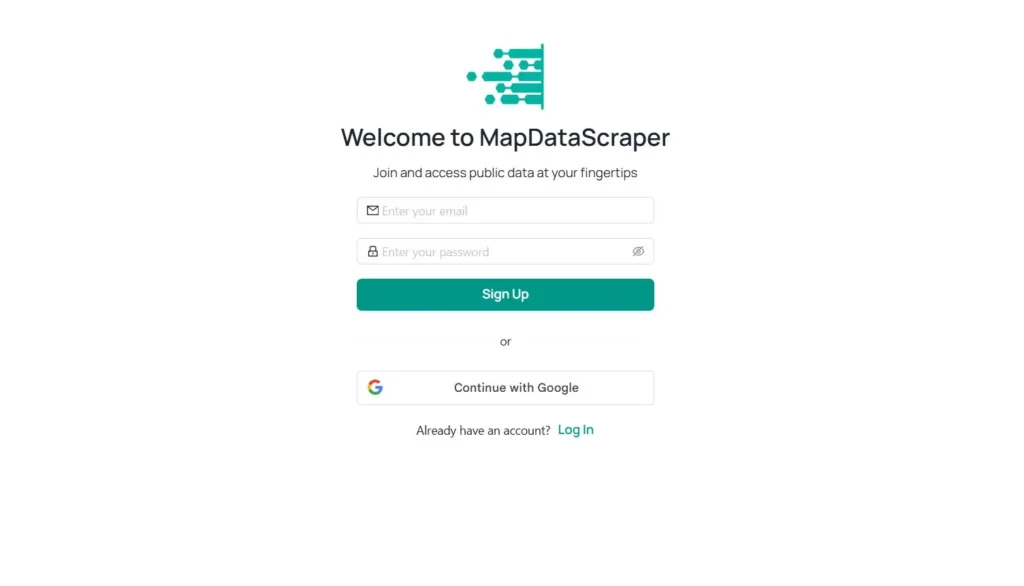
Open your web browser and to go our official MapDataScraper website. Login or Sign Up with MapDataScraper by following the on-screen instructions after providing your email and password.

MapDataScraper Sign-up
Sign-up or Login with your MapDataScraper account

Step 2: Explore MapDataScraper Dashboard

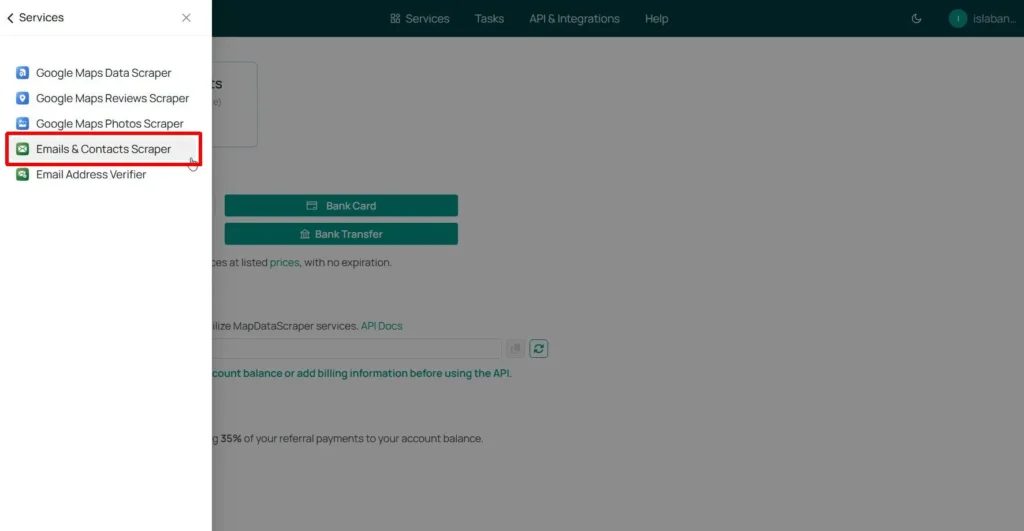
Once logged in with the MapDataScraper app, click the Services tab and Select Emails & Contacts Scraper.

Email and Contact Scraper Dashboard

Step 3: Creating Tasks and Setting Parameters

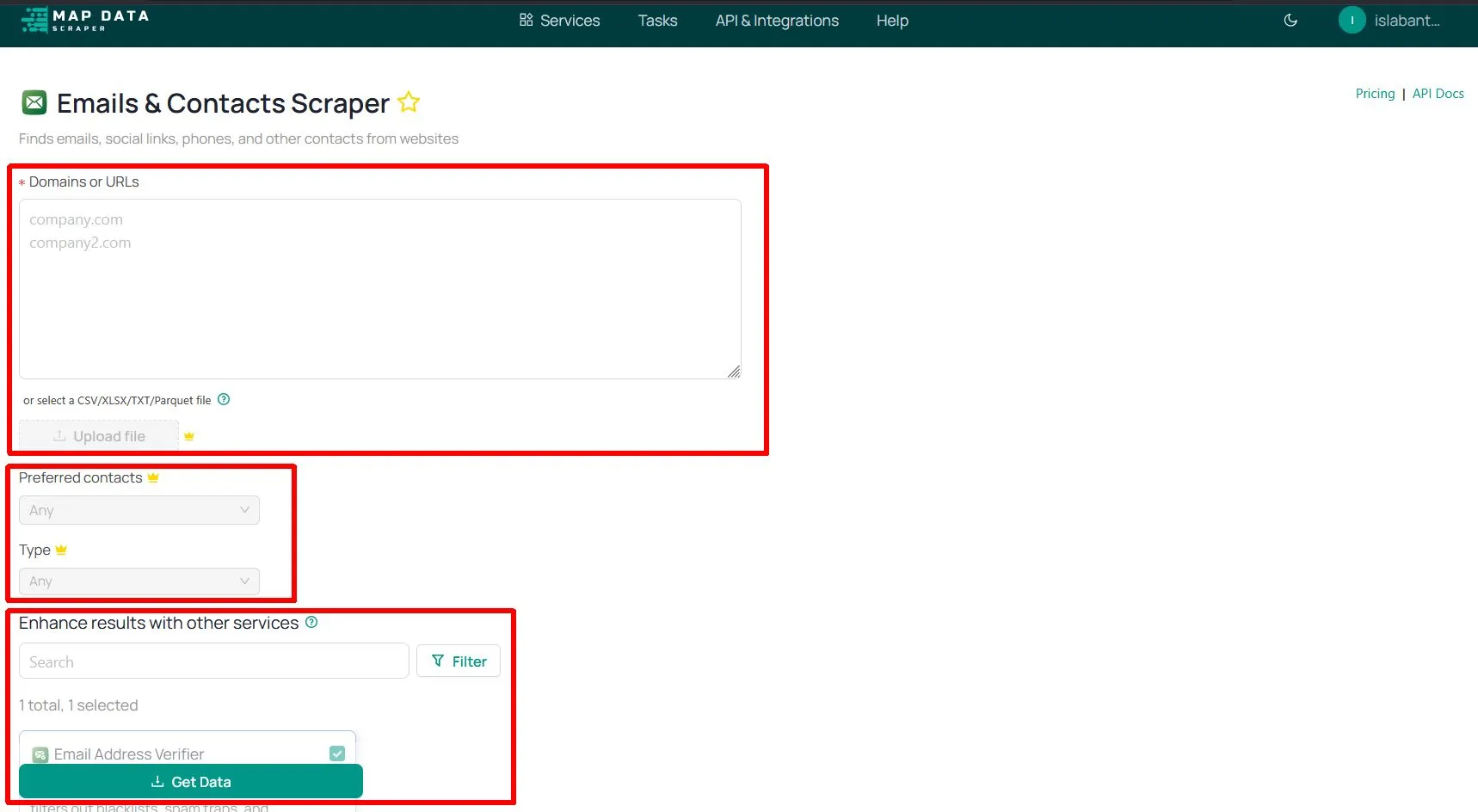
There are three essential parameters that should be defined to create a task inside the Emails & Contact Scraper dashboard. Start with the domains/URL list first. You can perform email scraping by using two different methods. The first one is to copy and paste the entire list into the dashboard while the other one is to upload the URL list directly.

Join Free Tier
Emails and Contacts Scraper
Emails & Contacts Scraper Dashboard

How to Copy/Paste the List

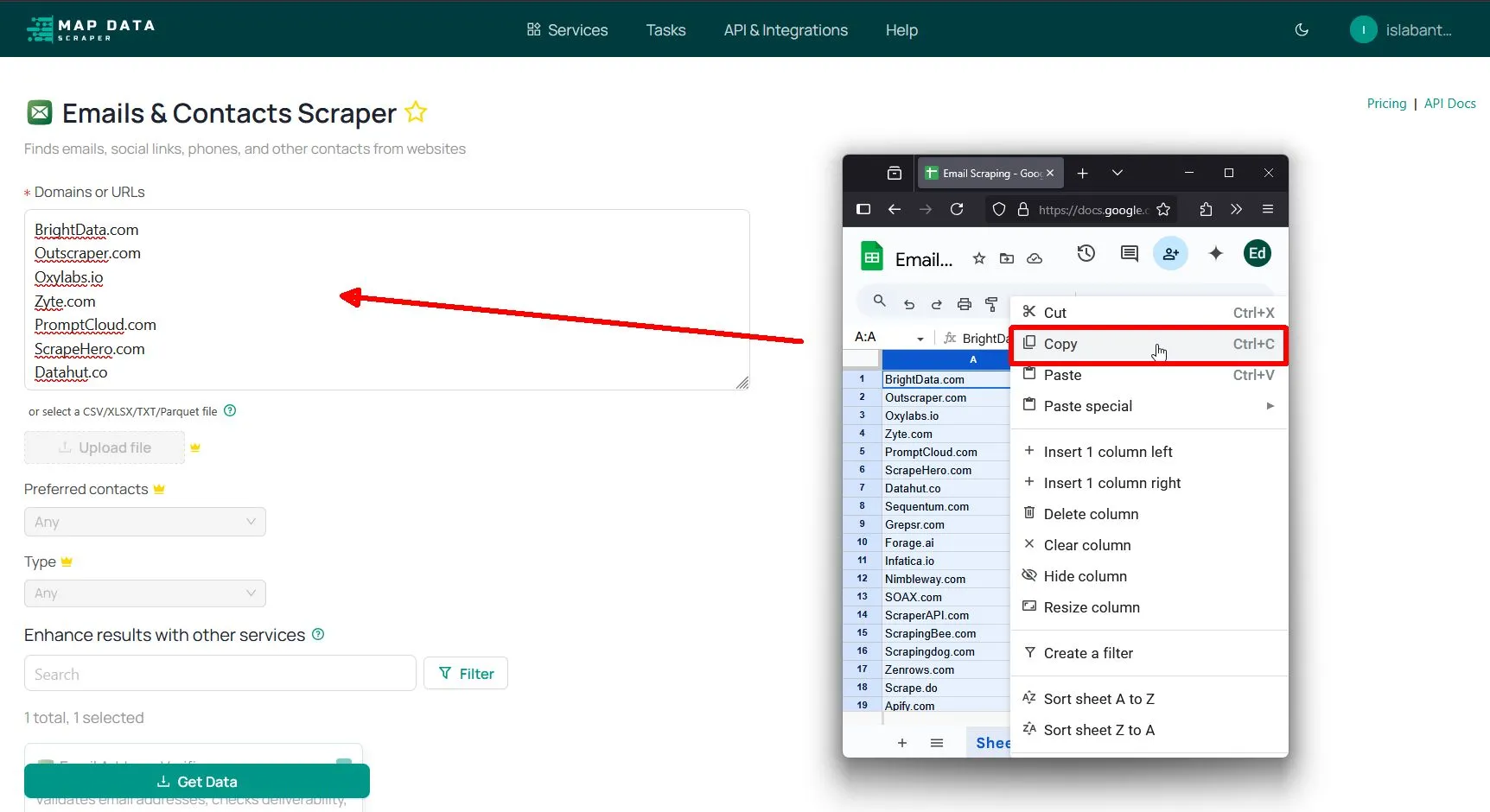
If you have a domain list of the emails that you want to scrape, paste it directly into the “Domains or URLs” box. After copy-pasting, you can continue editing the other task parameters.

Emails Scraper Copy Paste
Copy/Paste List of Websites to MapDataScraper

How to Upload CSV/XLSX/Parquet or TXT File

If you have a list of hundreds or thousands of domain names, copy-pasting them would be difficult, for this reason, MapDataScraper allows you to upload these large lists directly. Click the “Upload file” button but you should upgrade your account or topped up to use this option.  

Emails & Contacts Scraper

Get verified business emails, phone numbers, and websites directly from Google Maps. Build high-quality B2B lead lists in minutes.

Start Scraping Now →

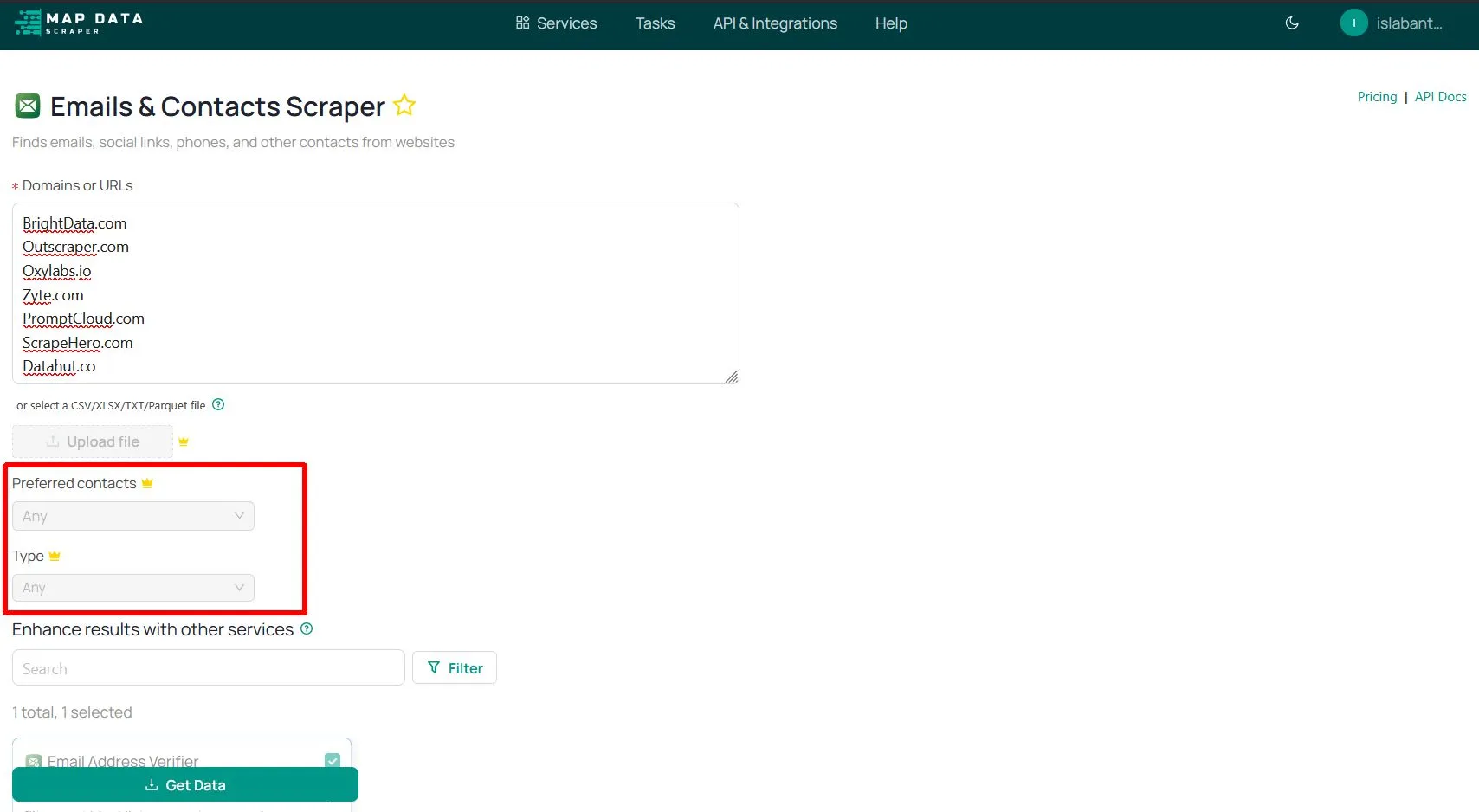
Preferred Contacts

This parameter will be available only to paid customers of MapDataScraper, once you’re using the free account, you cannot access this one. If you have a paid account, the Preferred contacts will give you plenty of options.

The preferred contacts include Decision Makers, Influencers/purchasing, Technical, Finance, Operations, Marketing, Sales, Maintenance, Human resources, Legal and compliances, Supply chain/logistics, and Education/Training.

Type

This option is only available for paid members of MapDataScraper. It will give you the option to choose whether General emails such as info@, support@, sales@, and etc. The other option is for Non General email such as specific names of the owner’s email.

Email Scrapers Preferred Contacts

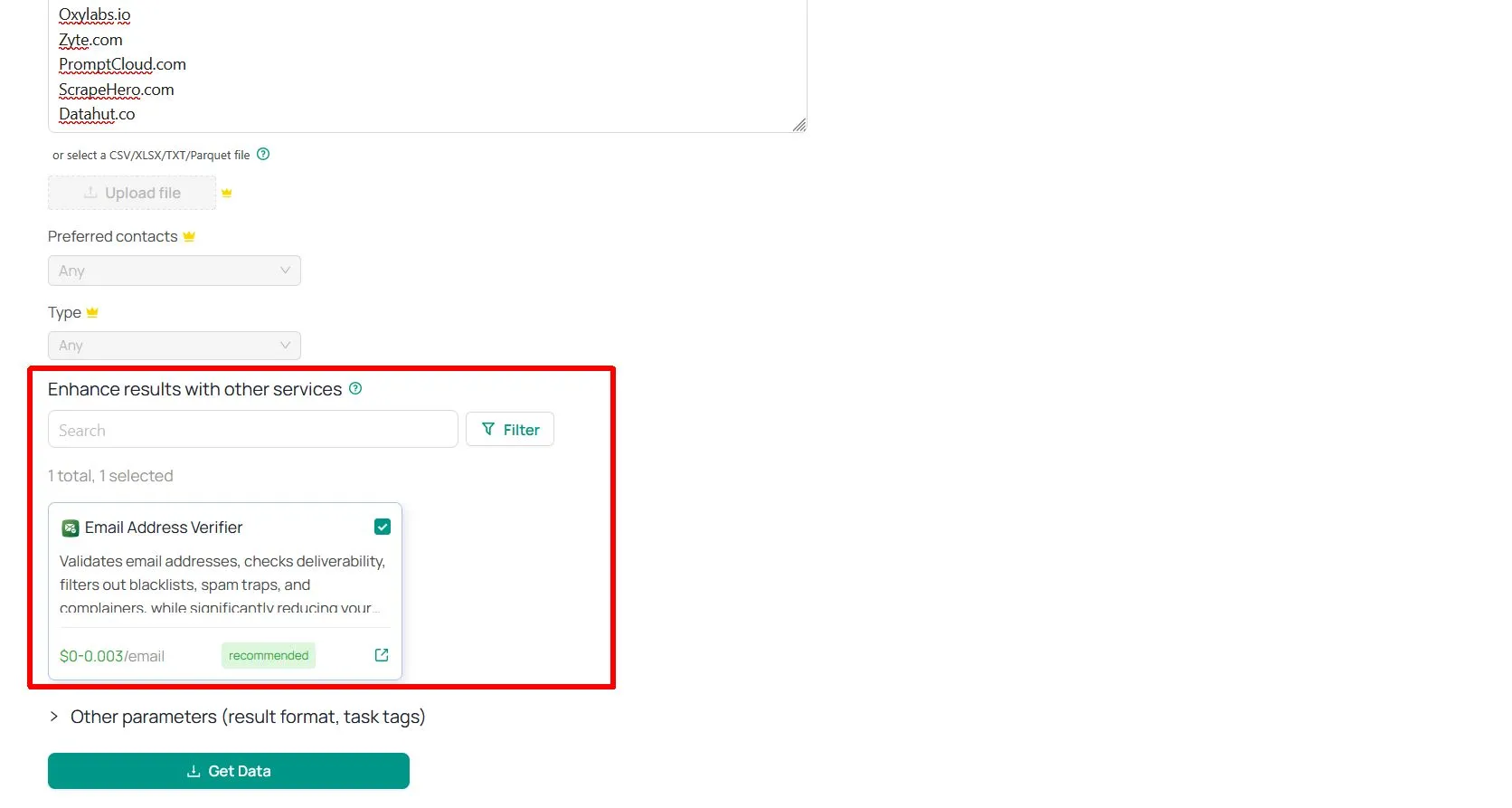
Enhance Results with other services.

There is a limited amount of fields you can get from Emails & Contacts Scraper. However, you can enrich the data with other tools by adding the services you need to the scraping pipeline.

One of the enhancements offered by MapDataScraper is the Email Address Verifier, it validates email addresses, checks deliverability, and filters out blacklists, spam traps, and complainers, while significantly reducing your rates.

Email Scraper Enhancement
Join Free Tier

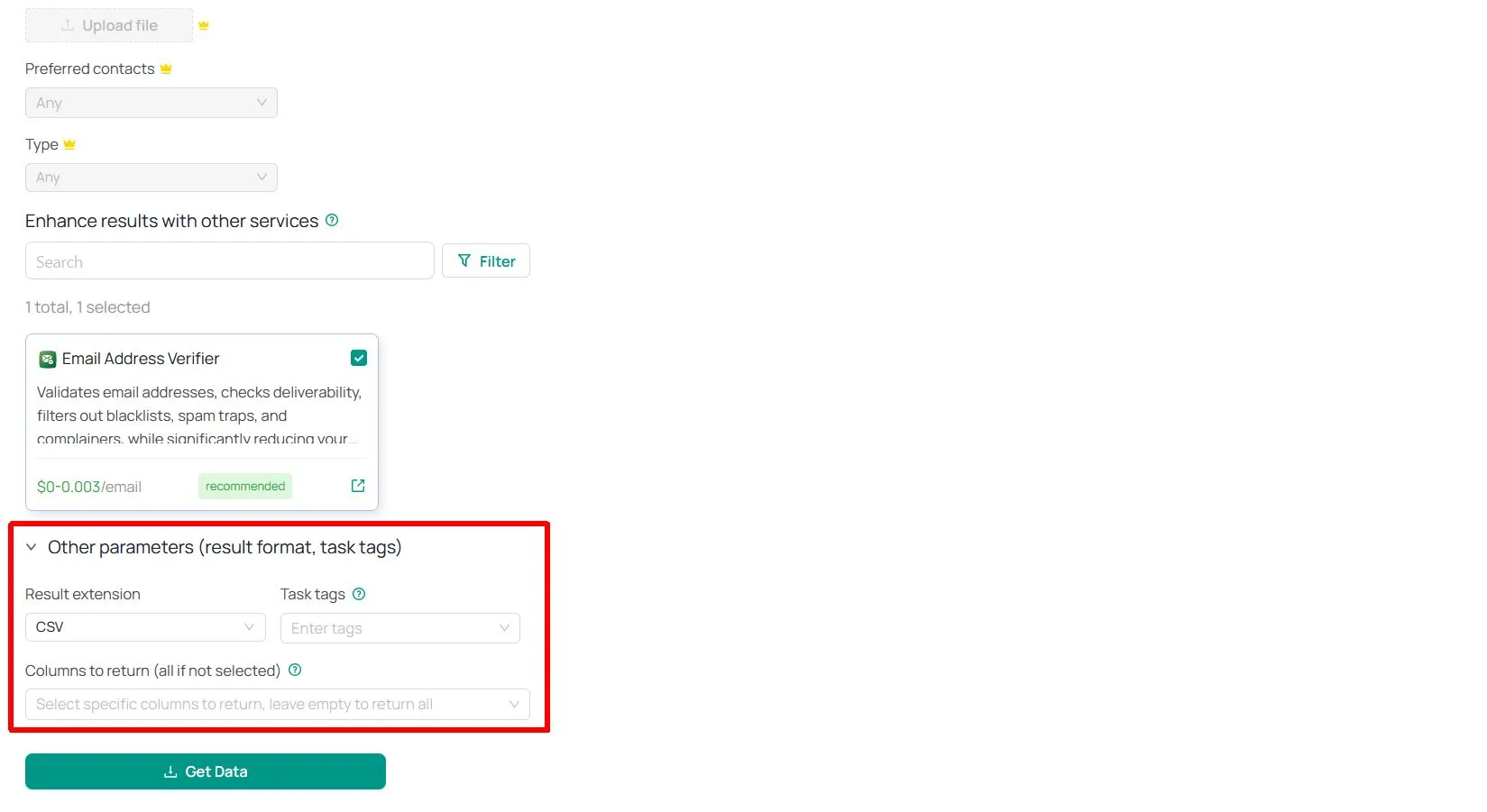
Other Parameters

After checking all the parameters, you can now select the result extension, the most suitable one from three different file formats (XLSX, CSV, JSON, and Parquet). You can also a Label to the Task tags for easier reference and find it later in the Task Page.

Email Scraper Other Parameters

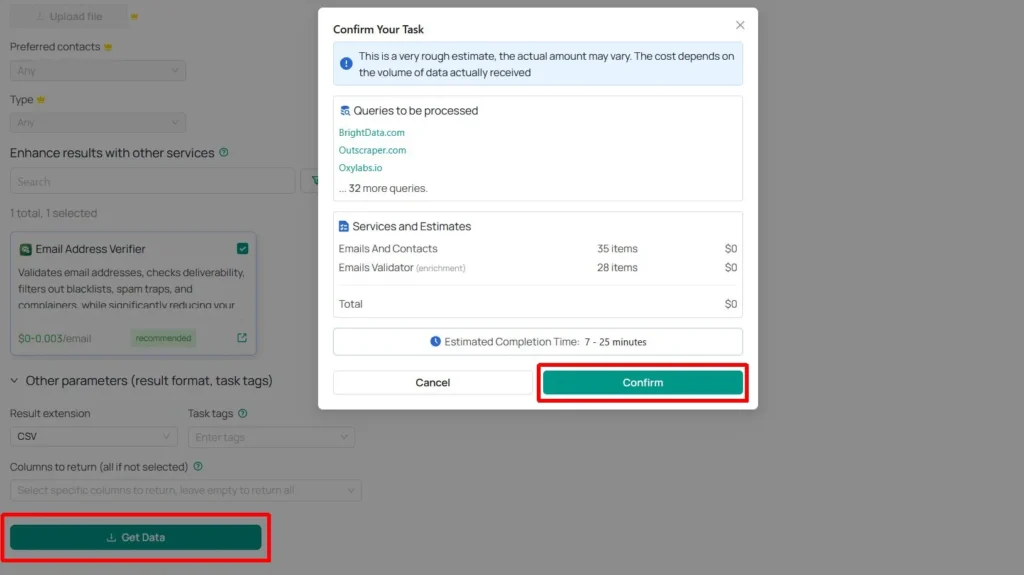
Step 4: Run the scraper by clicking “Get Data” and confirm the scraping task.

Email Scraper Get Data

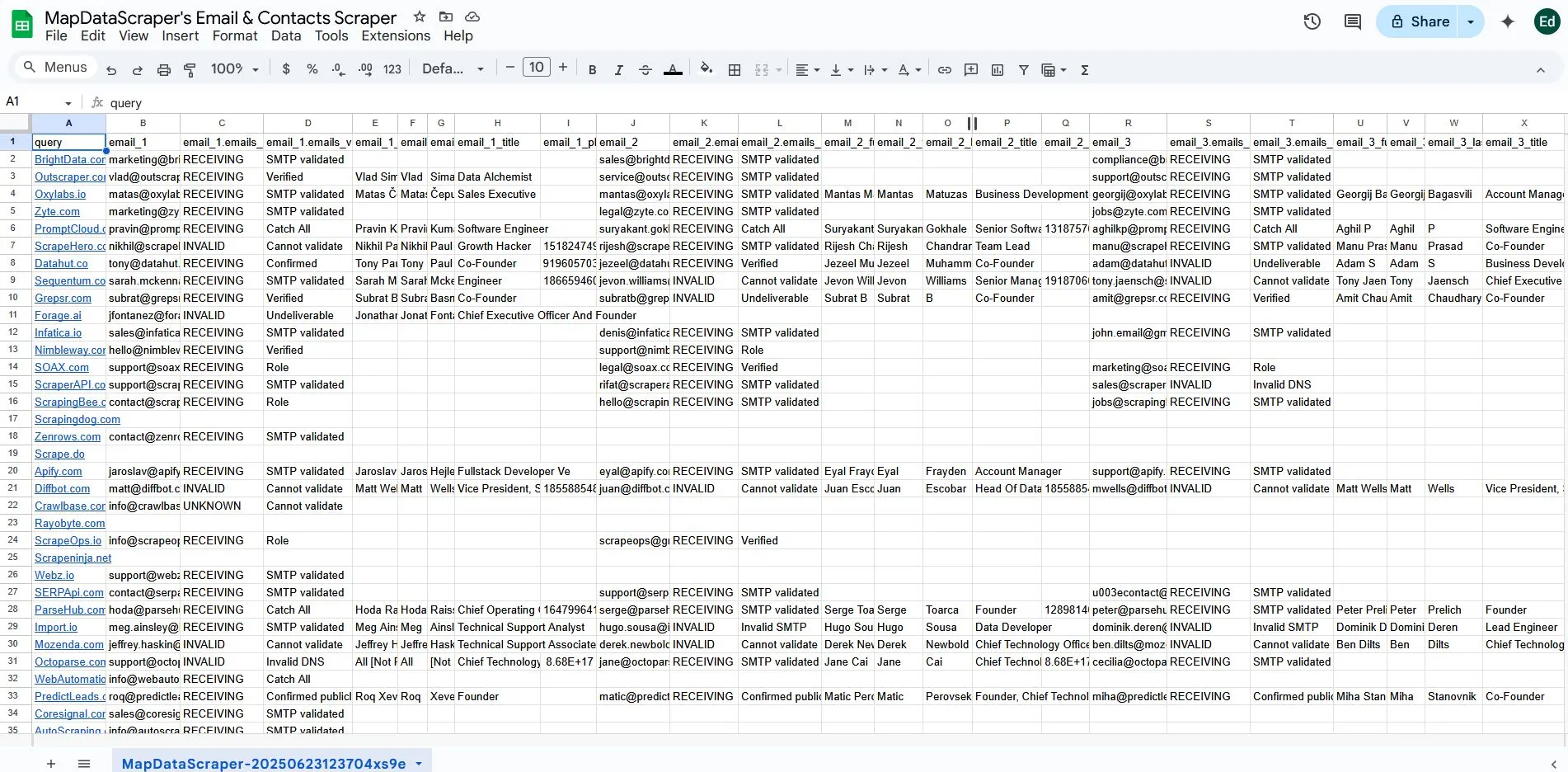
Step 5: Download and Analyze the Results

Email Scraper's Results

Emails & Contacts Scraper

Get verified business emails, phone numbers, and websites directly from Google Maps. Build high-quality B2B lead lists in minutes.

Start Scraping Now →

Post-Scraping: Maximizing Your Data

Once you’ve successfully scraped email addresses and contact information, the post-scraping tasks are where the real work begins. Transform your new data into a powerful asset that drives your marketing, sales, or research effort.

Here’s how to get the most of your scraped data:

  1. Data Cleaning and Normalization: Remove duplicates, standardize formats for consistency, correct errors, and remove unwanted elements to improve data quality.
  2. Data Enrichment: Add extra information (e.g., company size, industry, job titles) using third-party services. This provides deeper insights for better contact segmentation and more tailored messaging.
  3. Integration with Other Tools: Importing cleaned and enriched data into CRMs, email marketing platforms, and analytics tools. It will streamline workflows, aid relationship management, enable targeted campaigns, and support data-driven decisions.
Join Free Tier

Conclusion

You’ve learned how MapDataScraper makes finding contacts easy, turning long manual tasks into quick, automated steps. This Email Scraper tool helps marketers get more leads, researchers find key information, and businesses expand their reach. It allows for quick, accurate access to data, saving you valuable time.

However, using this powerful tool comes with important responsibilities. Always use scraped data ethically and legally, follow privacy laws like GDPR and CCPA, respect website rules, and only contact people who expect to hear from you. Responsible data use protects both your business and the individuals whose information you collect.

The world of contact data is always changing and growing. AI and new technologies will make scraping tools even smarter and more integrated. They’ll offer more precise data and deeper insights in the future.

You now have the knowledge to boost your lead generation and research efforts. We encourage you to try MapDataScraper and put these skills into practice. Start transforming your contact strategy today and grow your business by maximizing validated emails and contact details.

Start Scraping Today

Join hundreds of professionals using MapDataScraper to uncover new opportunities and grow their businesses.

Join Now for Free

FAQ

Most frequent questions and answers

What is the Emails & Contacts Scraper?

The Emails & Contacts Scraper is a tool that extracts publicly available contact information — including email addresses, phone numbers, and website URLs — from Google Maps business listings. It’s perfect for building targeted outreach lists and B2B lead generation.

What types of contact data can I extract?

Our scraper collects:

  • Business Email Addresses (publicly listed)

  • Phone Numbers

  • Websites

  • Business Names

  • Addresses and Locations

  • Categories and Ratings (optional with combo tools)

You can download this data in a structured format like CSV or Excel.

How can I use the extracted photos?

Where do the emails come from?
The scraper collects emails from publicly listed sources such as:

  • Google Maps profiles

  • Linked websites’ contact pages

  • About/Info pages linked from business listings

We only gather emails that are freely available online — never private or gated content.

Is it legal to scrape emails and contacts from Google Maps?

We only collect publicly accessible business contact information. However, users are responsible for using the data in accordance with anti-spam laws (like GDPR or CAN-SPAM) and Google’s terms of service. Always ensure your outreach is compliant.

Do I need technical skills to use the scraper?

Not at all! The Emails & Contacts Scraper is no-code and beginner-friendly. Just enter your search query, run the tool, and download clean, organized contact data — no coding or installations required.

Looking for a reliable way to gather business emails and contact details from Google Maps listings? The MapDataScraper Emails & Contacts Scraper is...

your go-to solution for extracting accurate, up-to-date contact information directly from business profiles — no coding, no manual copying, and no technical headaches.

Whether you’re a B2B marketer, lead generation specialist, or sales professional, our scraper helps you build high-quality prospect lists in minutes. It collects essential details like business emails, phone numbers, website URLs, and company names directly from Google Maps — giving you the contacts you need to power your campaigns.
Google Maps listings contain valuable public contact data for millions of businesses worldwide. With MapDataScraper, you can instantly extract this information and turn it into actionable leads for your sales outreach, email marketing, or business development efforts. Stop wasting time manually copying details and start automating your lead generation process.

Whether you’re targeting businesses in your city or across multiple countries, MapDataScraper makes it simple to access public contact details and turn them into qualified leads for your business.

Start extracting business emails and phone numbers today — fast, reliable, and scalable.

← Previous Post
Next Post →
  • Privacy Policy
  • Terms of Service

Copyright © 2026 MapDataScraper | Fast & Easy Maps Data Scraper