
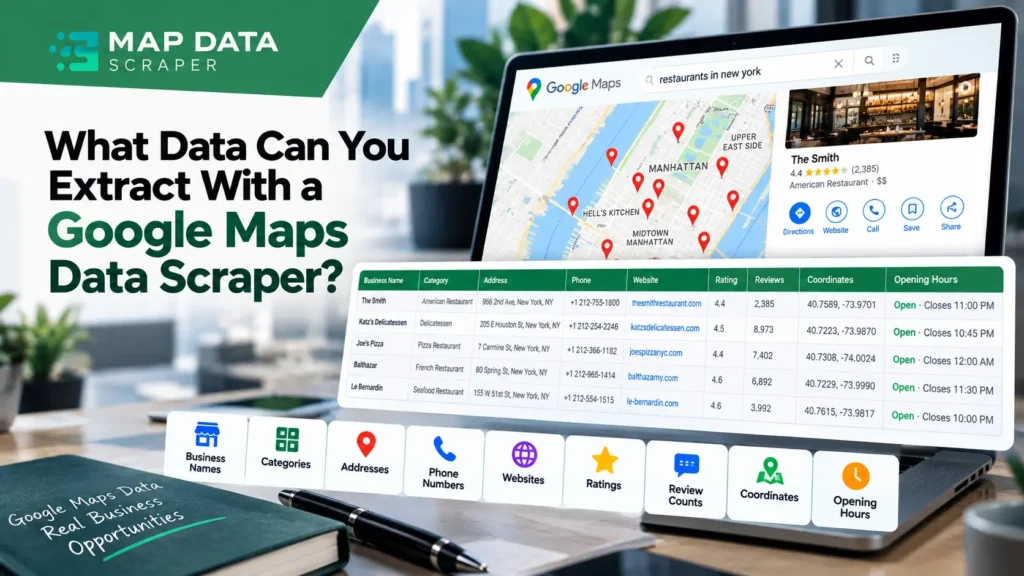
A Google Maps data scraper can turn business listings into structured data, but what information can you actually extract? Depending on the listing and scraping setup, the dataset can include business names, categories, addresses, phone numbers, websites, ratings, review counts, coordinates, opening hours, and other available business information. Some workflows can also add emails or contact details through enrichment rather than directly from the Maps listing.
Understanding these fields matters because different datasets serve different purposes. A sales team may need contact information, while a researcher may care more about locations, categories, ratings, or market coverage. This guide breaks down the main types of Google Maps data you can extract and what each can be used for.
Quick answer: A Google Maps data scraper can collect available business information such as names, categories, addresses, phone numbers, websites, ratings, review counts, locations, and opening hours. Additional data may be available through enrichment or separate extraction workflows. The exact fields depend on the source, listing, scraper, and extraction settings. Google’s current Places documentation also shows that available place fields vary by request and field selection.
Turn Google Maps Listings Into Usable Business Data
Map Data Scraper
Need business data from specific locations or categories? MapDataScraper helps you collect available Google Maps business information and export it for your next research, prospecting, or data workflow.
Start Scraping Google Maps DataWhat Data Can a Google Maps Data Scraper Extract?
Google Maps listings contain more than a business name and address.
Depending on the available listing information and the extraction workflow, business datasets can contain several categories of information.
At a practical level, think about the data in seven groups:
Business identity → Contact information → Location → Classification → Reputation → Operations → Enrichment
Google’s current Places documentation provides a useful reference for the types of place information that can exist, including display names, addresses, locations, business status, types, phone numbers, ratings, review counts, opening hours, websites, reviews, and other attributes.
For a scraping workflow, however, available does not always mean present for every business. A restaurant may have a website and phone number while another listing may have missing information. Your dataset should therefore be treated as a collection of available fields rather than a guarantee that every row contains every field.
| Data category | Examples | What it can help with |
|---|---|---|
| Business identity | Business name, status | Identify businesses |
| Classification | Primary type, categories | Segment businesses |
| Contact | Phone, website | Prospect research |
| Location | Address, coordinates | Geographic targeting |
| Reputation | Rating, review count | Market research |
| Operations | Opening hours, attributes | Business analysis |
| Enrichment | Additional contact information | Deeper prospect research |
The important distinction is that the value of the dataset depends on what you plan to do with it.
Business Information and Contact Details
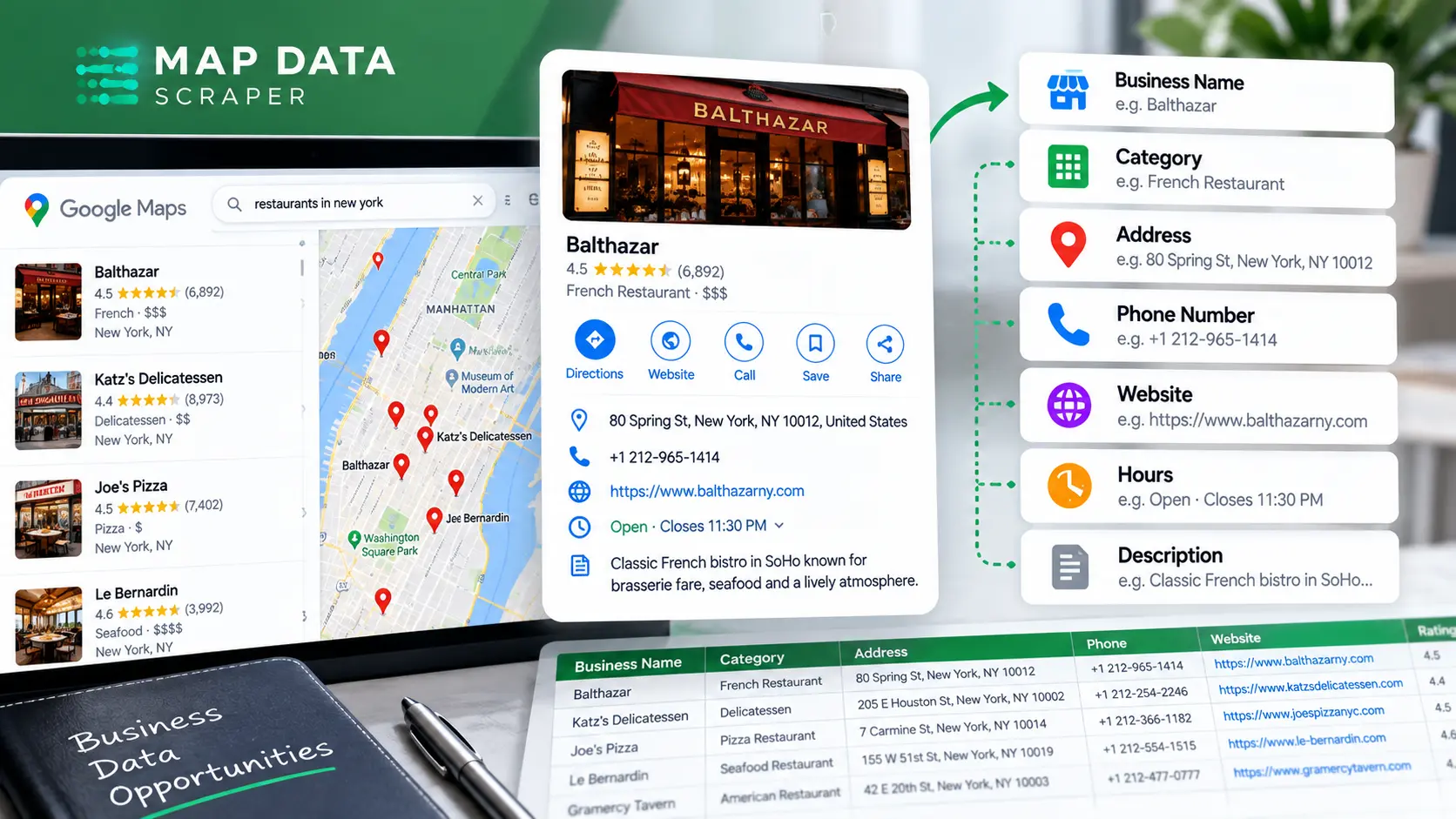
The first layer of a Google Maps dataset is usually the information that identifies and describes the business.
Business name
The business name is one of the most fundamental fields because it gives you a recognizable identifier for each listing.
For example, a dataset might contain:
- Business name
- Business type
- Address
- Phone number
- Website
This allows you to turn individual Maps listings into rows that can be filtered, sorted, analyzed, or imported into another workflow.
Google’s Places API documentation refers to the human-readable business name as displayName in the current API.
Business category and type
Business classification can be useful when you are looking for a particular type of company.
For example, you could organize a dataset around:
- Restaurants
- Dentists
- Hotels
- Real estate agencies
- Gyms
- Auto repair shops
- Marketing agencies
- Retail stores
Google’s current Places documentation includes both primaryType and types fields.
This makes category information useful for segmentation and filtering, especially when your research starts with a particular industry.
Address
The address tells you where the business operates.
A dataset can use address information for:
- Local market research
- Territory planning
- Location-based prospecting
- Business directories
- Geographic segmentation
- Competitor research
Google documents formatted addresses and address components as separate place fields.
Phone number
Phone numbers can provide a direct contact point for businesses where that information is available.
Google’s current Places documentation includes both national and international phone-number fields.
For sales or prospecting workflows, phone data can be combined with other fields to create a more useful business research dataset.
Website
A business website can be particularly useful when the next step is researching the company beyond its Maps listing.
For example, you can use the website to investigate:
- Services
- Products
- Contact information
- Company positioning
- Locations
- Other qualification signals
Google currently documents websiteUri as a place field.
Important: a website field is different from an email address. Having a website does not mean that a public business email is automatically available.
Location, Ratings, Reviews, and Operating Information
Business data becomes more useful when you add information about where the business is located, how it is represented, and how customers interact with it.
Latitude and longitude
Location coordinates can help turn a simple business list into geographic data.
For example, coordinates can support:
- Mapping businesses
- Geographic segmentation
- Territory analysis
- Distance-based research
- Local market analysis
Google’s current Places documentation includes a location field as well as viewport and timezone-related fields.
Ratings
Ratings can provide a quick indication of how customers have evaluated a business on Google.
For example, a researcher could segment businesses based on rating ranges when studying a local market.
However, a rating should not be treated as a complete measure of business quality. It is one signal within a larger dataset.
Google currently lists rating as a place field.
Review count
Review count adds useful context to a rating.
Consider two businesses:
- Business A: 5.0 rating from 8 reviews
- Business B: 4.7 rating from 1,200 reviews
The numbers tell different stories even though both businesses have strong ratings.
Google’s current Places API identifies this field as userRatingCount.
This is why datasets are often more useful when you analyze rating and review count together rather than looking at the rating alone.
Reviews
Reviews are a separate layer of information from the basic business record.
Google’s current Places documentation includes reviews as a field, but it is categorized separately from basic business identity and contact fields.
For deeper review collection and analysis, MapDataScraper also provides a dedicated Google Maps Reviews Scraper, rather than treating review extraction as identical to ordinary business-data extraction.
Opening hours
Opening hours can add an operational dimension to a business dataset.
You may use them to study:
- When businesses operate
- Whether businesses serve customers on particular days
- Differences between competitors
- Potential timing for outreach or research
Google’s current documentation includes regular and current opening-hours fields.
What About Emails, Contacts, and Enriched Data?
Map Data Scraper
This is actually a strong conversion point because the reader has just learned that raw Maps data and enriched data are different. Have the Business Data. Now Make It Useful.
Start with businesses, categories, and locations that match your workflow. Collect the available data, apply filters, and use enrichment when you need additional information.
Find Businesses to Scrape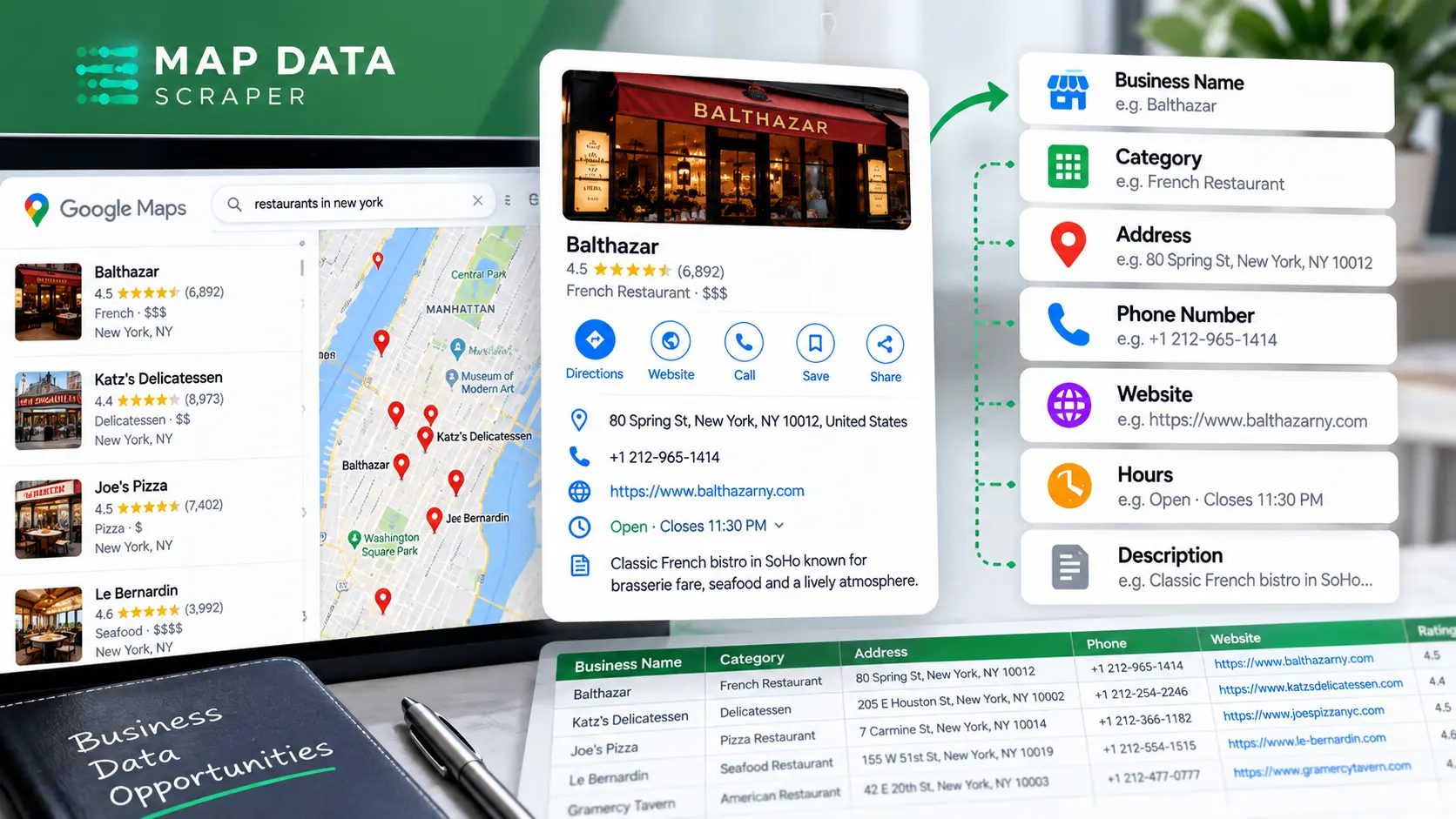
What About Emails, Contacts, and Enriched Data?
This is where it is important to distinguish Google Maps data from enriched business data.
A Google Maps listing may provide a phone number and website, but that does not mean every listing contains a business email or additional contact information.
For example:
Maps data
→ Business name
→ Category
→ Address
→ Phone
→ Website
→ Rating
→ Reviews
→ Location
→ Opening hours
Enriched data
→ Additional contact information
→ Additional company details
→ Other data gathered from an enrichment process
This distinction prevents a common mistake: assuming that a Google Maps scraper automatically produces a complete sales lead record.
MapDataScraper’s current pricing page lists enrichments alongside its Google Maps Data Scraper, as well as CSV, Excel, Parquet, and JSON exports, advanced filters, and API access on applicable plans.
So if your workflow requires more than the information available from the business listing itself, look at the enrichment step separately.
A scraped business record is not automatically a qualified lead. It is a data record that can become more useful after filtering, enrichment, research, and qualification.
That distinction is especially important for sales teams and agencies.
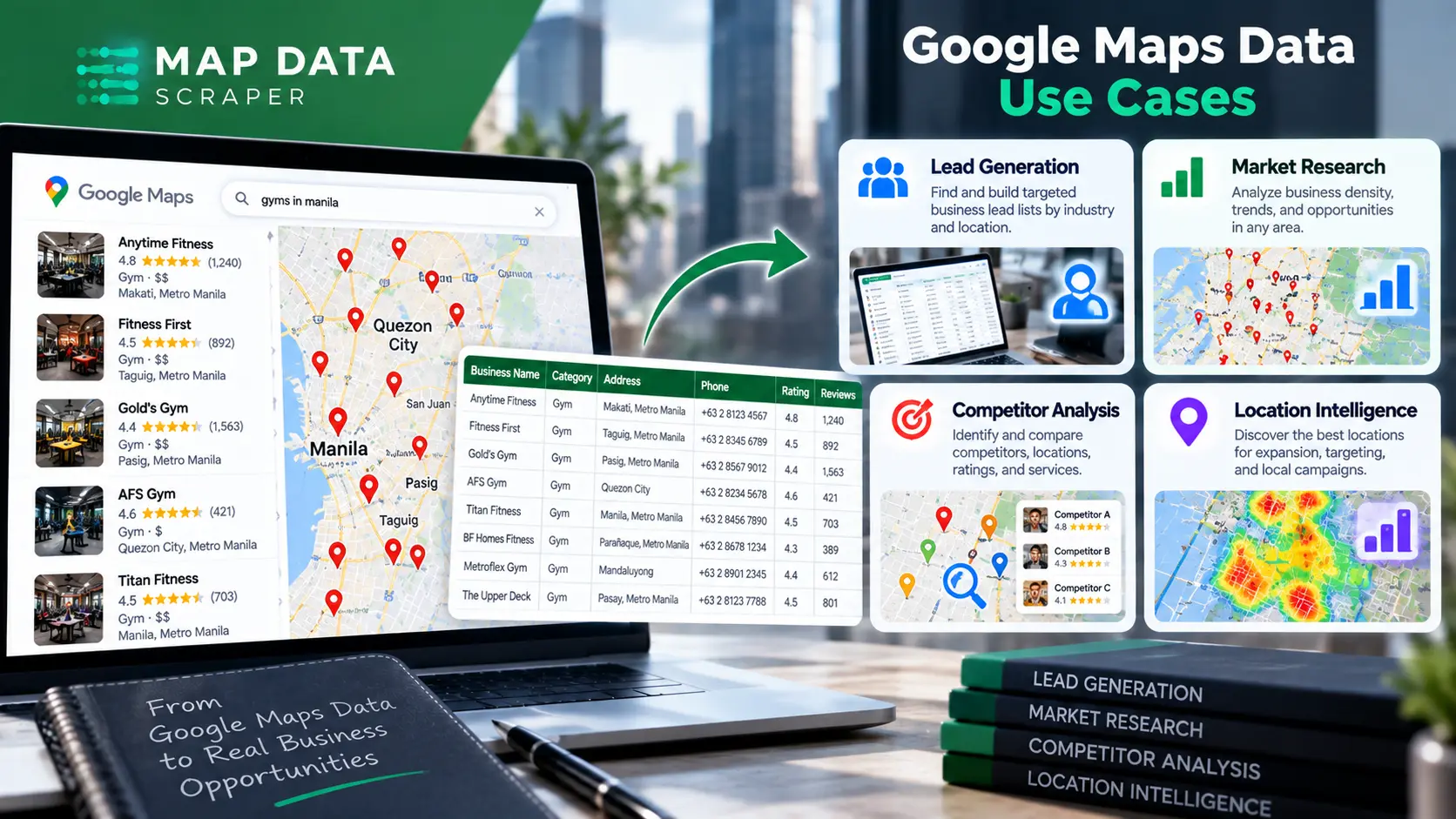
What Can You Do With Google Maps Data?
Once business information is structured into a dataset, the same fields can support several different workflows.
Lead generation
Businesses can use location, category, website, phone, and other available information to build prospect lists around a defined market.
For example:
Business type: Dental clinics
Location: Austin
Additional filters: Rating, website
The resulting dataset can then move into a separate qualification process.
Local market research
A structured dataset can help answer questions such as:
- How many businesses of a particular type appear in a market?
- Where are they concentrated?
- Which categories are common?
- How many have websites?
- How does review activity vary across businesses?
The value here is not simply collecting rows. It is being able to analyze a market systematically.
Competitor research
Google Maps data can also help identify businesses operating within the same geographic or category space.
You might compare:
- Business categories
- Locations
- Ratings
- Review counts
- Websites
- Operating information
The dataset gives you a starting point for deeper research.
Location intelligence
Coordinates, addresses, categories, and business attributes can be useful when geographic context matters.
For example, a company could study where certain business types are concentrated before deciding where to focus sales, research, or expansion efforts.
Business directories and datasets
Structured business information can also be used to organize internal datasets or research databases.
The important part is maintaining a clear distinction between collecting data and using that data responsibly.
What Can You Do With Google Maps Data?
Map Data Scraper
Turn Local Business Data Into Your Next Opportunity
Search by business type, keyword, and location to build a structured dataset you can use for prospecting, market research, competitor analysis, or location research.
Explore MapDataScraperWhat You Should Know Before Using Scraped Data
Getting a dataset is only the beginning.
Not every listing contains every field
A business may have a phone number but no website. Another may have a website but limited operating information.
Your extraction process should therefore account for missing values.
Data can change
Businesses change their:
- Names
- Addresses
- Phone numbers
- Websites
- Opening hours
- Categories
A dataset represents information available at the time of collection. For workflows that depend on current information, periodic re-checking can be useful.
Enrichment is different from extraction
If you need information beyond the business listing, determine whether you need an additional enrichment step.
This prevents you from designing a workflow around fields that aren’t actually available from the source.
A larger dataset is not automatically a better dataset
Collecting thousands of businesses can be useful, but only if the dataset matches your actual research or prospecting criteria.
A smaller dataset with the right:
- Location
- Business type
- Contact information
- Qualification criteria
may be more useful than a much larger unfiltered export.
Check how you plan to use the data
Google’s current Places documentation notes that data returned through Google Maps Platform is subject to applicable policies and attributions.
If you’re collecting or using business information for commercial purposes, make sure your workflow also considers applicable privacy, marketing, data-protection, and platform requirements.
The goal is not simply to collect more data.
It is to collect the right data for a clearly defined purpose.
Where Does Google Maps Data Fit in Your Workflow?
A useful way to think about Google Maps scraping is as a data-discovery stage rather than the entire lead-generation process.
1. Discover
Find businesses based on categories, keywords, and locations.
2. Extract
Collect available business information such as names, addresses, websites, phone numbers, ratings, and other fields.
3. Filter
Remove businesses that don’t match your geographic, category, or other criteria.
4. Enrich
Add information that isn’t available from the initial business record when your workflow requires it.
5. Qualify
Apply your own criteria to determine which businesses are actually relevant prospects.
6. Analyze or engage
Use the resulting dataset for market research, competitor analysis, prospecting, or another defined business workflow.
This approach keeps the role of a Google Maps data scraper clear:
It helps you turn scattered business listings into structured data that you can work with.
FAQ
Most frequent questions and answers
Depending on the scraper and available listing information, a dataset can include business names, categories, addresses, phone numbers, websites, ratings, review counts, coordinates, opening hours, and other available business information.
Yes, phone numbers are among the contact fields associated with place information. Availability depends on the individual business listing and the extraction method. Google’s current Places documentation includes national and international phone-number fields.
Email availability depends on the scraping and enrichment workflow. A business email should not automatically be assumed to be a standard Google Maps field. If email data is required, check whether the scraper provides an enrichment process that supports it.
Ratings and review counts are available as place information, while reviews can be handled as a separate data layer. Google’s current Places documentation includes rating, userRatingCount, and reviews fields.
Yes. Business information such as category, location, website, phone number, and other available fields can be used to build prospect datasets. However, extracting a business record does not automatically qualify that business as a sales lead.
Google Maps data refers to information available from the business/place listing. Enrichment adds additional information through another data source or enrichment process. Keeping these two stages separate helps you understand what your scraper actually collected.
Turn Google Maps Listings Into Structured Business Data
Map Data Scraper
If your workflow starts with businesses, categories, and locations, MapDataScraper can help you collect and export Google Maps business data in structured formats. Its current Google Maps Data Scraper supports CSV, Excel, Parquet, and JSON exports, with advanced filters, enrichments, and API access available on applicable plans.
Start with the data you actually need, then filter and qualify it for your specific workflow.
Start Scraping with MapDataScraper